
You May Not Want to Upgrade to Alexa+ Just Yet
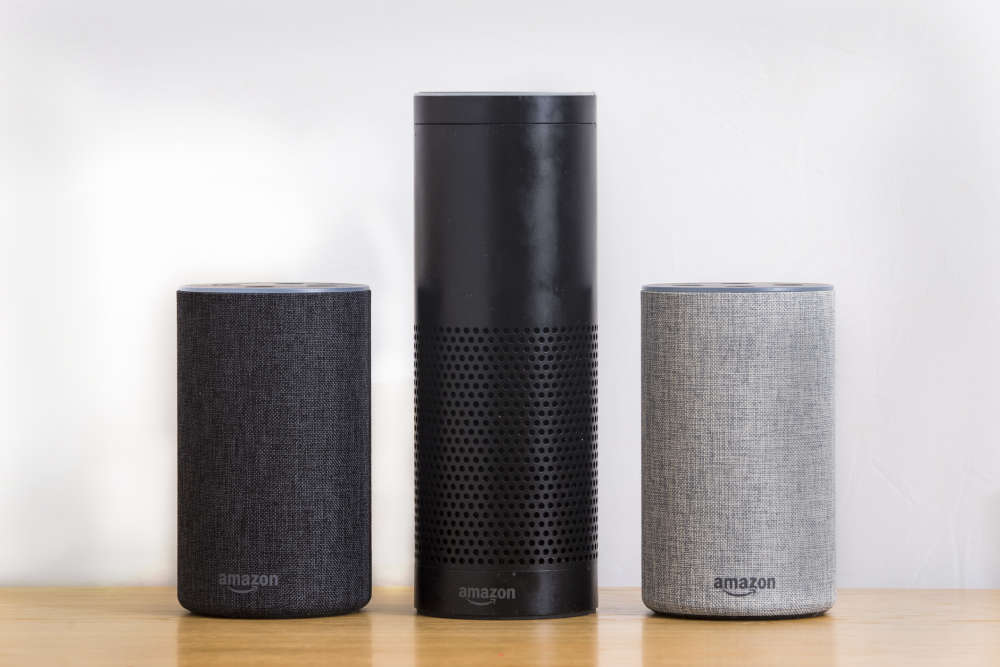
Photo Credit: ID 111106272 | Alexa © James Copeland | Dreamstime.com
Ray Scott - Thursday, April 23rd, 2026
Have you tried to invoke our skill on Alexa to listen to our station and find it isn't working? You have probably upgraded to Alexa+
You May Not Want to Upgrade to Alexa+ Just Yet: What Radio Listeners Need to Know (April 2026)
Are you an avid Alexa user, especially for tuning into your favorite radio stations? You might have heard buzz about the new Alexa+, Amazon's AI-powered voice assistant. While it promises a smarter, more conversational experience, you might want to hold off on hitting that upgrade button just yet. Here's a comprehensive guide, especially for radio station listeners, outlining why you might want to stick with your current Alexa setup for a little longer.
Since its launch in February 2026, Alexa+ has been causing some disruption for users. While the upgrade promises improvements in conversational ability, context awareness, and task completion through generative AI technology, the early-access release has exposed numerous compatibility problems, broken skills, and performance issues.
Understanding Alexa+ and Why It's Different
Alexa+ isn't just a simple update; it's a complete overhaul of how Alexa works. The original Alexa followed your commands directly. Alexa+ uses conversational AI, powered by advanced AI models like Amazon's Nova and Anthropic's Claude, to understand natural speech, context, and even incomplete thoughts.
This new system is incredibly complex, orchestrating across thousands of services and devices. It uses "experts" to handle specific tasks, like controlling smart home devices, making reservations, playing music, and coordinating deliveries. Think of it as adding a super-smart brain to your Alexa, but with some growing pains.
However, this leap to generative AI has introduced significant tradeoffs. The old Alexa used deterministic rule-based processing that delivered fast, predictable responses but operated rigidly. Alexa+ uses probabilistic machine learning models that make it more creative and capable of understanding nuance but also slower and less predictable.
Device Compatibility: Will Your Echo Even Work with Alexa+?
Here's a crucial point: not all Alexa devices will be compatible with Alexa+. Amazon has stated that only newer hardware generations will support the upgrade. If you have older devices like the Echo Dot (1st Generation), Echo (1st Generation), or Echo Show (1st Generation), they'll continue running the "original Alexa" and retain full access to the Skills Store.
This means if you have a mix of old and new devices, you could have an inconsistent experience in your home. Your radio station skill might work perfectly on your older Echo in the kitchen but struggle on your newer Echo Show in the living room.
Skill Compatibility: A Major Headache for Many
The biggest issue right now is that many Alexa skills simply aren't working properly with Alexa+. Amazon itself admits that "not all features/Skills will be compatible or work properly." Users are reporting skills that won't launch, execute incorrectly, or just don't work at all.
Our Radio Station Skill is Not Working Properly
We've noticed that our own radio station skill has been experiencing issues since the Alexa+ rollout. We're working hard to resolve this, but it highlights the widespread compatibility problems.
For radio listeners, this is a major concern. Popular radio skills like TuneIn, iHeartRadio, NPR One, and many others are essential for accessing your favorite stations. While these larger services will likely be prioritized, smaller or niche radio stations might face compatibility issues.
If your favorite radio station skill suddenly stops working after upgrading to Alexa+, you're not alone.
Performance Issues: Slower Response Times
Beyond compatibility, Alexa+ users are experiencing slower response times. Speed is critical for a voice assistant. Imagine asking Alexa to play your favorite morning show and waiting 30 seconds for it to start! This is a common complaint with Alexa+, making the experience frustrating.
The reason for this slowdown is the shift to more complex AI processing. Original Alexa could execute commands almost instantly. Alexa+ has to engage in complex inference, route the request through multiple AI models, and then execute the action.
Missing Features: The Promise vs. Reality
Amazon initially showcased impressive capabilities for Alexa+, but many of these features are still missing. Things like using third-party apps like GrubHub, generating bedtime stories, and brainstorming gift ideas were demonstrated but aren't yet available.
Amazon CEO Andy Jassy has acknowledged that more functionality is planned, but there's no firm timeline. This means you might be upgrading based on promises that haven't been fulfilled.
User Reviews: A Mixed Bag
User reviews of Alexa+ are all over the place. Some users praise its conversational fluidity and improved visual interface on Echo Show devices. One Tom's Guide reviewer noted that Alexa+ understands even her four-year-old daughter with a speech delay, successfully identifying her based on voice patterns.
However, others warn against upgrading entirely, citing device groups no longer working, skills being inaccessible, extreme slowness, and overall system instability. One user even recommended "AVOIDING UPGRADE AT ALL COSTS" because "the system is too broken for use."
TechRadio notes that Alexa+ is still in Early Access, essentially making all current users beta testers.
The Early Access Program Reality Check
It's crucial to remember that Alexa+ is still in early access. While Amazon has made it available to millions of Prime members, it's essentially an extended beta test. As of May 2025, only 100,000 users had access to Alexa+, demonstrating that Amazon is deliberately limiting the rollout to monitor systems and identify problems.
How to Opt Out and Return to Original Alexa
If you've already upgraded and are experiencing issues, you can easily revert to original Alexa. Simply say "Alexa, end Early Access." You can also manage your early-access enrollment through your Amazon account.
Radio Station Integration and Skill Challenges
For radio station listeners, the upgrade to Alexa+ presents particular challenges. Radio has returned to kitchens, bedrooms, and offices through Alexa, fundamentally changing audio consumption patterns for tens of millions of users.
Smaller radio stations and niche streaming services have no guarantee that their skills will continue functioning once their user base upgrades.
Privacy and Data Considerations in the Upgrade
Be aware of the privacy implications of Alexa+. Review your privacy settings and understand what data Amazon collects and how it's used.
Conclusion: Waiting Remains the Prudent Choice for Most Users
For most Alexa users, especially radio listeners, it's best to wait before upgrading to Alexa+. The early-access rollout has exposed significant problems that continue affecting user experience.
The ability to opt out of Alexa+ and revert to original Alexa means that upgrading is not an irreversible decision, but the burden of troubleshooting a broken system places unnecessary friction on users who should reasonably expect their devices to simply continue working.
As 2026 progresses and Amazon addresses the currently documented issues, Alexa+ will likely become increasingly compelling and reliable. For now, patience remains the wisest strategy for most users.
Share

POWERED BY:
Schedule
-
 Shimes in the Morning
6:00am - 10:00am
-
 Judith Gross
10:00am - 2:00pm
-
 Thunder Reynolds
2:00pm - 7:00pm
Recently Played
-
How Will I Know
Whitney Houston -

Your Love
Outfield -
Go Your Own Way
Fleetwood Mac -

I'm Still Standing
Elton John -
Don't Stop Believin
Journey -

Heart Of Glass
Blondie
Supporting Local Businesses

- Reach More Potential Customers across multiple channels
- Hands-on local Marketing Consultant
- Locally Owned and Operated

Upcoming Events
-
Vintage Sip N’ Shop
Our Vintage Sip N' Shop fundraiser will feature a wide variety of groovy and stylish clothing, unique antiques, delicious samples of local libations, basket raf...
at Southern Tier Independence Center
